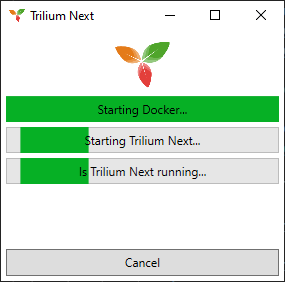
Docker App Starter
2025-02 - 2025-12
The purpose of this app is to create nicely looking startup windows from shortcuts for docker apps.
How to use
You can use this app in 2 way, using startup args or json file.
In both cases you need to create a shortcut to the DockerAppStarter executable.
Startup args
As for now, following arguments are supported:
| Argument | Name | Description |
|---|---|---|
| -s | Stack | This argument is optional. This is stack of your services. |
| -sv | Service | Single service within stack. |
| -i | Image | Image that will be shown in the starter window. |
| -d | Dependency | The name of the service within same stack that main service depends upon. |
Json file
You can create json file and reference it by -f startup argument, like this:
-f C:\Absolute\Path\To\File.json
Example file
{
    "WindowTitle": "Ghost",
    "DisplayName": "Ghost",
    "Stack": "local-apps",
    "Service": "ghost-1",
    "ImageFilePath": "D:\\data\\DockerAppStarter\\ghost.png",
    "IconFilePath": "D:\\data\\DockerAppStarter\\ghost.ico",
    "Dependencies": [
        {
            "WindowTitle": "Ghost DB",
            "DisplayName": "Ghost DB",
            "Stack": "local-apps",
            "Service": "ghost_db-1",
            "ImageFilePath": "D:\\data\\DockerAppStarter\\ghost.png",
            "IconFilePath": "D:\\data\\DockerAppStarter\\ghost.ico",
            "Dependencies": []
        }
    ]
}
The properties are as follow:
| Key | Description |
|---|---|
| WindowTitle | This will be shown as window title. |
| DisplayName | This will be shown as service name. |
| Stack | This is stack of your services. This value is optional. |
| Service | Single service within stack. |
| ImageFilePath | Path to the image that will be shown. |
| IconFilePath | Path to icon that will be shown wihin app title bar. |
| Dependencies | Collection of dependencies. Each element has same structure. |
Limitations
As for now, only 1 level of dependencies is supported. If need for more occur, then the implementation will happen.
D:\run\DockerAppStarter\DockerAppStarter.Gui.exe -s local-apps -sv trilium-1 -i D:\data\DockerAppStarter\trilium-next.png
Gallery